
Apache Spark Certification Exam Topics List
If I were preparing for a Spark certification today, I’d focus on 6 things first: DataFrames and SQL, joins, partitions, performance, streaming, and testing.
Most Spark exams are less about theory and more about whether I can write the code, read the plan, and avoid common mistakes. Across exams like Databricks Associate, Databricks Data Engineer Professional, and AWS Data Engineer Associate, the same patterns show up again and again.
Here’s the short version of what I’d make sure I can do without notes:
- Read and write CSV, JSON, Parquet, and JDBC data
- Work with schemas, nulls, arrays, structs, and
explode() - Use
groupBy(), window functions, and Spark SQL - Pick the right join and avoid cross joins by mistake
- Know when to use
repartition()vs.coalesce() - Spot shuffles, scans, and filters in
.explain() - Use broadcast joins and avoid Python UDFs when built-in functions work
- Handle watermarks, output modes, and checkpoints in streaming
- Test DataFrame logic with small inputs and expected outputs
- Understand Medallion layers, idempotent jobs, and WAP checks
A lot of exam questions boil down to one thing: Can I get the right result in a way Spark can run well? That means code skill, plan reading, and pipeline judgment all matter.
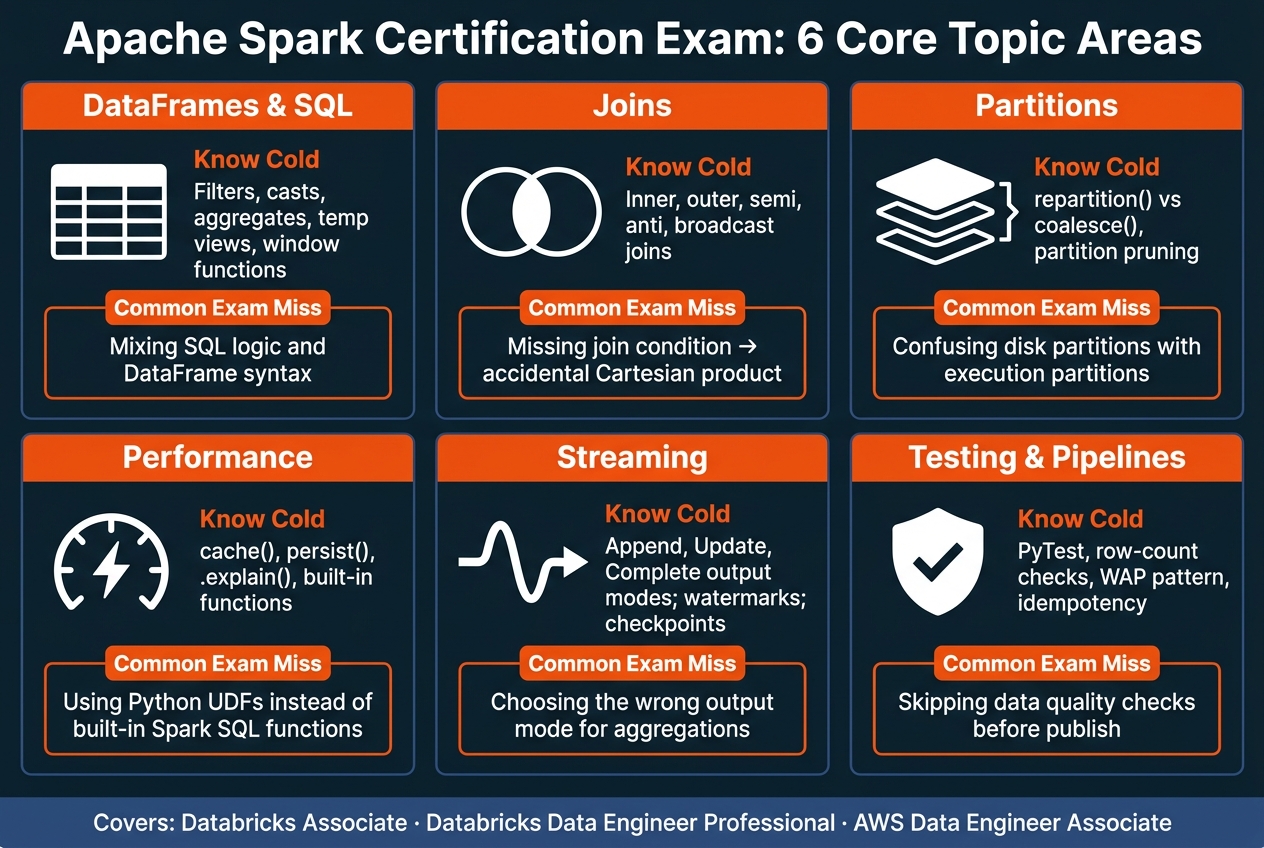
Apache Spark Certification Exam Topics: What to Know Cold
Databricks Associate Developer for Apache Spark - 30 Practice Questions & Answers
sbb-itb-61a6e59
Quick Comparison
| Area | What I’d know cold | Common exam miss |
|---|---|---|
| DataFrames & SQL | Filters, casts, aggregates, temp views, windows | Mixing SQL logic and DataFrame syntax |
| Joins | Inner, outer, semi, anti, broadcast | Missing join condition |
| Partitions | Repartition, coalesce, pruning | Confusing disk vs. execution partitions |
| Performance | Cache, persist, .explain(), built-in functions |
Using Python UDFs too early |
| Streaming | Append, update, complete, checkpoints, watermarks | Wrong output mode |
| Testing & pipelines | PyTest, row-count checks, WAP, idempotency | Skipping data checks before publish |
In short: if I can build batch and streaming flows, debug query plans, and test my outputs, I’m covering the main ground these exams tend to test.
DataFrames and Spark SQL Checklist
This checklist focuses on the DataFrame and SQL skills that show up on most Spark exams: loading data, changing columns, aggregating results, and switching between DataFrames and SQL. Start with the basics of how Spark reads, transforms, and queries tabular data.
DataFrame Creation, Schemas, and Core Transformations
Know how to read and write CSV, JSON, Parquet, and JDBC data with the DataFrame reader and writer APIs. For quick reads, schema inference is fine. But when data types or nullability need to be set exactly, use StructType and StructField.
You should also know the core transformation methods: select(), filter() / where(), withColumn(), withColumnRenamed(), and dropDuplicates(). For missing data, use fillna() when you want to replace values and dropna() when you want to remove rows. Be comfortable with arrays, structs, maps, and explode() too.
These basics lead straight into aggregation and SQL-style questions.
Aggregations, Window Functions, and Spark SQL Queries
Know groupBy() with count(), sum(), avg(), and countDistinct(). If a SQL query uses HAVING, you’ll usually handle that in the DataFrame API with a filter after the aggregation.
Window functions matter a lot here. Be ready to use Window.partitionBy().orderBy() in the DataFrame API and the matching OVER (PARTITION BY ... ORDER BY ...) syntax in SQL for ranking and running totals. You should also be comfortable with WHERE, GROUP BY, HAVING, ORDER BY, and LIMIT. To query DataFrames with Spark SQL, use .createOrReplaceTempView() and .createGlobalTempView().
Built-in functions for dates, timestamps, and strings also come up a lot.
Next, look at the same logic in both DataFrame API and SQL syntax.
DataFrame API vs. SQL: Side-by-Side Comparison
Exams often ask you to convert a SQL query into DataFrame API code, or the other way around. The logic doesn’t change. Only the syntax does.
Use this table as a quick reference for common test patterns:
| SQL Pattern | DataFrame API Equivalent |
|---|---|
SELECT col1, col2 |
.select("col1", "col2") |
WHERE col1 > 10 |
.filter(col("col1") > 10) or .where() |
col1 AS new_name |
.withColumnRenamed("col1", "new_name") |
CAST(col AS STRING) |
.withColumn("col", col("col").cast("string")) |
GROUP BY col1 HAVING count(*) > 1 |
.groupBy("col1").count().filter(col("count") > 1) |
ORDER BY col1 DESC |
.orderBy(col("col1").desc()) |
DISTINCT |
.distinct() or .dropDuplicates() |
UNION ALL |
.union(otherDF) |
LEFT JOIN table2 ON ... |
.join(df2, "id", "left") |
WITH cte AS (...) |
cte_df = df... (variable assignment) |
Run .explain() after each transformation to inspect the query plan.
Joins, Partitions, and Performance Checklist
After DataFrames and SQL, exam questions usually move to row movement, shuffle cost, and storage layout. At this stage, it’s not just about getting the right answer. It’s about getting that answer with the right execution plan.
Join Types, Join Conditions, and Common Mistakes
A classic join mistake is producing a Cartesian product by accident. That usually happens when the join condition is missing, or when a cross join slips in without you noticing. It’s the kind of small miss that can blow up row counts fast.
So check your join keys carefully. If you don’t, you can end up with duplicate rows or a cross join you never meant to create. On the exam, expect questions that test which join keeps rows, avoids duplicates, or causes a shuffle.
| Join Type | Rows Kept | Typical Exam Scenario |
|---|---|---|
| Inner | Matching rows only | Standard filtering where only related data is needed |
| Left / Right Outer | All rows from the "outer" side, matches from the other | Identifying missing records or keeping all primary entities |
| Full Outer | All rows from both sides | Merging two datasets where neither is a complete master |
| Left Semi | Left rows with a match in right | Filtering a dataset based on key existence in another table |
| Left Anti | Left rows with no match in right | Finding orphaned records or exclusions |
| Cross Join | Cartesian product; avoid unless required | - |
Once the join logic is right, the next thing to check is how much data Spark has to move to finish the job.
Partitioning, Repartition, Coalesce, and Partition Pruning
It helps to separate execution partitions from disk partitions. They sound similar, but they’re not the same thing. Disk partitions are folder paths like /year=2026/month=08/, while execution partitions are how Spark splits work across the cluster.
When your filter matches a disk partition column, Spark can skip whole directories instead of reading everything. That’s partition pruning, and it can speed up reads a lot.
| Feature | Repartition | Coalesce |
|---|---|---|
| Shuffle | Full shuffle of all data | Merges existing partitions with little or no shuffle |
| Partition Count | Can increase or decrease | Can only decrease |
| Data Balance | Roughly equal-sized partitions | Can result in uneven partitions |
| Exam Scenario | Use to increase parallelism or fix data skew | Use to reduce output file count before writing |
A simple way to think about it: repartition reshuffles data to make a new partition layout, while coalesce mostly shrinks what you already have. If you need more parallelism, use repartition. If you want fewer output files before a write, coalesce is often the better pick.
After that, the next question is whether repeated reads make caching or broadcasting worth it.
Caching, Physical Plans, and Optimization Patterns
cache() stores a DataFrame in memory. persist() gives you more control, including memory, disk, or serialized storage. Use them when the same DataFrame is read more than once. Otherwise, Spark may recompute it each time, which is a waste.
Here are the patterns that show up most often:
- Broadcast join: A small table joins to a large table. This avoids a shuffle and is very fast, but the small table has to fit in executor memory. This matters a lot on the exam and is often the best pattern for dimension table joins.
- Shuffle-based join: Two large tables are joined together. This works for big data, but it comes with high network I/O and disk overhead. You should know when there’s no way around it.
- Cache / Persist: A DataFrame is used more than once. This can save recomputation, but it uses memory or storage, so there’s a trade-off.
When you inspect a physical plan, pay attention to Exchanges, Scans, and Filters. Those are your clues for spotting shuffles and predicate pushdown.
One more rule shows up again and again: prefer built-in Spark SQL functions over Python UDFs. Python UDFs force JVM-Python serialization, which adds overhead. Built-in functions stay inside the JVM, and Catalyst can optimize them.
Structured Streaming, Testing, and Pipeline Work Checklist
Structured Streaming Basics, Output Modes, and Watermarks
After batch tuning, Spark exams often move into streaming topics like state, recovery, and late data.
Structured Streaming uses readStream and writeStream to run work in micro-batches. The output mode matters because it decides what Spark writes after each trigger.
| Output Mode | What Gets Written | Common Exam Trap |
|---|---|---|
| Append | Writes only new rows since the last trigger. | Cannot be used with aggregations unless watermarking is applied |
| Update | Writes only changed rows since the last trigger. | Often confused with Complete; it does not rewrite the whole table |
| Complete | Writes the full result table on each trigger. | Only supported for streaming queries with aggregations; inefficient for large stateful tables |
For stateful aggregations and stream-stream joins, set a watermark so Spark knows how long to keep late data in state. If you skip this, state can hang around longer than you want, and that’s a classic exam pitfall.
You also need checkpointLocation in writeStream. That gives the query a place to store progress and state so it can recover after a failure.
Testing Spark Code and Checking Data Quality
Once a stream is running, the next step is proving that the output is right.
A good way to test Spark code is to treat transformations like pure functions: DataFrame in, DataFrame out. That makes local testing much simpler. You can start a small Spark session, pass in a tiny synthetic dataset, and compare the result with what you expect. PyTest is a solid fit for this.
When checking data quality, focus on the basics first:
- Schema
- Values
- Row counts
- Uniqueness
- Null rates
- Referential integrity
These checks matter before joins or writes, when bad data can spread fast. The Write-Audit-Publish (WAP) pattern gives this process some structure: write to a staging area first, test the data there, and only move it to production if it passes the checks.
For streaming edge cases, keep tests small and isolated. That’s the easiest way to catch late-arriving data, schema mismatches, and duplicate records from Kafka before pushing code to a cluster.
Batch and Streaming Pipeline Patterns for Exam Scenarios
Most exam scenarios follow a pattern you can spot pretty fast once you’ve seen it a few times.
Bronze is raw data. Silver is cleaned data. Gold is aggregated output. That’s the Medallion Architecture, a standard Lakehouse pattern.
Idempotent jobs give the same output when rerun, which is a big deal for retries. In plain English: if a job fails and you run it again, you don’t want duplicate rows sneaking in. For streaming pipelines, checkpoints and transactional writes help stop that from happening during retries.
These are the pipeline patterns most Spark exams test.
Conclusion: Your Spark Exam Prep Topic Checklist
This checklist lines up with what Spark certification exams usually test: DataFrame fluency, Spark SQL, join correctness, partition strategy, optimization basics, streaming behavior, and testable pipeline design.
Use this last pass to check what you can do without notes:
| Exam Domain | Key Sub-Topics to Verify |
|---|---|
| DataFrames/SQL | API transformations, SQL queries, UDFs, complex types (Arrays/Structs) |
| Joins | Broadcast vs. Shuffle joins, join conditions |
| Optimization | Caching, physical plans, memory tuning, shuffle reduction |
| Partitions | Repartition vs. Coalesce, bucketing, partition pruning |
| Streaming | Kafka integration, watermarks, output modes |
| Testing/Quality | PyTest for Spark, Write-Audit-Publish (WAP), idempotency |
Knowing the names of these topics isn't enough. The exam leans on hands-on work. You should be able to build batch and streaming pipelines end to end, then check them with tests and query-plan reviews.
If you want more practice, DataExpert.io Academy has hands-on boot camps, capstone projects, and access to Databricks, Snowflake, and AWS.
FAQs
Which Spark topics should I study first?
Start with Apache Spark fundamentals: architecture, core components, and best practices. That gives you the context you need before you move into tougher work.
Then spend time on hands-on tasks with DataFrames, Spark SQL, and job management. After that, shift to performance tuning, partitioning, and unit testing.
How much Structured Streaming is usually on Spark exams?
Structured Streaming is usually a smaller topic on Spark exams, not the main thing you’ll be tested on.
Most of the time, it shows up as one dedicated streaming/real-time pipelines section alongside broader exam coverage like batch Spark, Spark SQL/DataFrames, joins, and optimization.
In DataExpert.io Academy materials, Structured Streaming is placed within streaming pipelines content, rather than treated as the biggest exam area.
Do I need to know query plans for the exam?
Yes - at least at a basic level. Understanding query execution plans matters if you want to improve performance.
The curriculum also covers Spark architecture and optimization, including joins and partitioning.